2.0 Computer Speaker OEM Guide: Custom RGB, Bluetooth, USB Audio, Packaging & Branding
2.0 Computer Speaker OEM Guide: Custom RGB, Bluetooth, USB Audio, Packaging & Branding
Introduction
For gaming brands, computer accessory companies, importers, retailers, and Amazon sellers, 2.0 computer speakers provide a flexible entry into desktop audio.
Compared with traditional basic PC speakers, modern 2.0 speaker systems can combine:
USB digital audio
Bluetooth connectivity
RGB lighting
Physical volume controls
Stereo sound
Compact desktop design
Private-label branding
However, creating a successful 2.0 computer speaker does not always require developing an entirely new product from zero.
Depending on the brand's budget, sales volume, and target market, the project may begin with:
Private label
ODM customization
Semi-custom development
Full OEM development
The key is deciding which features should be customized and which proven technologies can remain unchanged.
This guide explains how brands develop custom 2.0 computer speakers, including product positioning, RGB, Bluetooth, USB audio, acoustic design, packaging, quality control, and mass production.
What Is an OEM 2.0 Computer Speaker?
An OEM 2.0 computer speaker is manufactured according to a customer's specific product requirements.
The system normally contains:
Left speaker
Right speaker
without a separate subwoofer.
Depending on the project, OEM customization may include:
Housing design
Speaker drivers
USB audio
Bluetooth
RGB lighting
Controls
Sound tuning
Branding
Packaging
The depth of customization can vary significantly.
OEM vs ODM vs Private Label
Before starting development, buyers should understand the different approaches.
Private Label
Private label normally begins with an existing speaker model.
Typical customization includes:
Logo
Packaging
Product labels
This provides a relatively fast route to market.
ODM
ODM also uses an existing manufacturer-developed product platform.
However, brands may have additional customization options such as:
Housing color
RGB behavior
Bluetooth name
Selected functions
Semi-Custom Development
Semi-custom projects reuse proven technologies such as:
Existing PCB
Existing acoustic platform
Existing drivers
while modifying selected areas such as:
Cabinet appearance
Grille
Controls
RGB
Full OEM
Full OEM can involve deeper development such as:
New industrial design
New tooling
Custom PCB
Custom acoustic architecture
New RGB system
The right strategy depends on the brand's commercial goals.
Why Brands Customize 2.0 Computer Speakers
Customization can help solve several business challenges.
Product Differentiation
A generic speaker may compete mainly on price.
Customized products can differentiate through:
RGB design
Sound
Controls
USB connectivity
Industrial design
Brand Recognition
Gaming brands can create speakers that match existing:
Keyboards
Mice
Headsets
PC accessories
Better Market Fit
Different users may require different features.
For example:
Gamers may value:
RGB
USB audio
Stereo separation
Office users may prefer:
Simple controls
Clear voice reproduction
RGB off mode
Customization allows the product to match a defined user group.
Step 1: Define the Target Customer
Before choosing specifications, define the intended user.
Possible target customers include:
PC gamers
Students
Home-office users
Streamers
Multimedia users
Each user group creates different priorities.
Step 2: Define the Target Retail Price
A common product-development mistake is designing first and calculating the commercial model later.
A better approach is:
Target Retail Price
↓
Target Landed Cost
↓
Target Factory Cost
↓
Product Specification
This helps prevent unnecessary features from pushing the product outside the intended price category.
Step 3: Choose the Product Architecture
Brands need to decide which connectivity system the speaker should use.
Possible configurations include:
USB Power + AUX
A simple solution suitable for cost-focused desktop speakers.
USB supplies power.
AUX provides the audio signal.
USB Audio
USB provides digital audio from the computer.
Depending on the power architecture, the same connection may also supply power.
Bluetooth + AUX
Provides:
Wireless convenience
Traditional wired compatibility
USB Audio + Bluetooth
A strong configuration for modern gaming and desktop speakers.
USB provides PC connectivity.
Bluetooth provides wireless playback from smartphones and other devices.
Step 4: Decide Whether One-Cable USB Is Needed
A one-cable desktop speaker can provide both:
Power
Digital audio
through one USB connection when the product architecture and power requirements allow it.
Benefits include:
Cleaner desk
Easier setup
Fewer cables
This can be a strong selling point for:
Gaming
Home offices
Laptop users
However, engineers need to confirm whether available USB power can support:
Amplifier
Drivers
RGB
Bluetooth
Other electronics
Step 5: Select Speaker Drivers
Driver selection affects:
Bass
Clarity
Maximum volume
Product dimensions
Cost
A brand should not simply request the largest possible driver.
The driver must work correctly with:
Cabinet volume
Amplifier
Power architecture
Target sound
A properly matched smaller driver can perform better than a larger driver placed in an unsuitable enclosure.
Step 6: Design the Acoustic Cabinet
Each cabinet forms part of the acoustic system.
Engineers need to consider:
Internal volume
Driver location
Sealing
Bass structure
Electronics placement
Some products may use:
Sealed enclosures
Bass ports
Passive radiators
The correct solution depends on size, cost, and target sound.
Step 7: Maintain Left and Right Channel Balance
Stereo consistency is especially important in 2.0 speaker systems.
One cabinet may contain:
PCB
Bluetooth
Amplifier
Controls
while the second cabinet may contain fewer electronics.
This can create differences in internal acoustic volume.
Engineers should compensate for these differences so both channels provide balanced performance.
Step 8: Customize the Sound Profile
Depending on the product architecture, sound tuning may be adjusted.
Possible directions include:
Gaming Sound
Focus:
Impact
Game effects
Detail
Balanced Sound
Suitable for:
Gaming
Music
Movies
General use
Bass-Focused Sound
Suitable for users who prefer stronger low-frequency presentation.
The target sound should be defined according to the consumer rather than the preference of one buyer or engineer.
Step 9: Bluetooth Integration
Bluetooth increases product versatility.
Users can connect:
Smartphones
Tablets
Laptops
Compatible PCs
Manufacturers should consider:
Connection stability
Reconnection
Antenna placement
Firmware
Private-label brands may also customize the Bluetooth device name depending on the product platform.
Step 10: USB Digital Audio
For gaming and modern desktop speakers, USB audio can create a stronger product proposition.
The speaker can be recognized by the computer as an audio output device.
Development may involve:
USB audio controller
PCB integration
Firmware
Compatibility testing
Brands should clearly distinguish USB audio from USB power-only products.
Step 11: AUX Connectivity
AUX remains useful for:
Monitors
PCs with analog outputs
Other supported devices
It can also provide a simple backup connection.
However, brands should avoid adding interfaces simply to make the specification list longer.
Each connection should serve a clear customer need.
Step 12: RGB Lighting Customization
RGB is one of the strongest visual differentiation opportunities for gaming-oriented 2.0 speakers.
Lighting may appear:
Around drivers
Along cabinet edges
Under the speaker base
Behind the grille
Around the logo
The left and right speakers should create a coordinated visual effect.
RGB Synchronization
Because a 2.0 speaker is displayed as a pair, inconsistent lighting is especially noticeable.
Manufacturers need to ensure:
Colors match
Effects remain synchronized
Brightness is consistent
This may require:
Shared lighting control
Wired synchronization
Appropriate firmware
RGB Effects
Possible modes include:
Static color
Breathing
Color cycling
Gradient effects
More sophisticated lighting may support:
Multiple zones
Customized sequences
However, more effects also create:
More firmware
More testing
Greater cost
The lighting system should match the product's retail positioning.
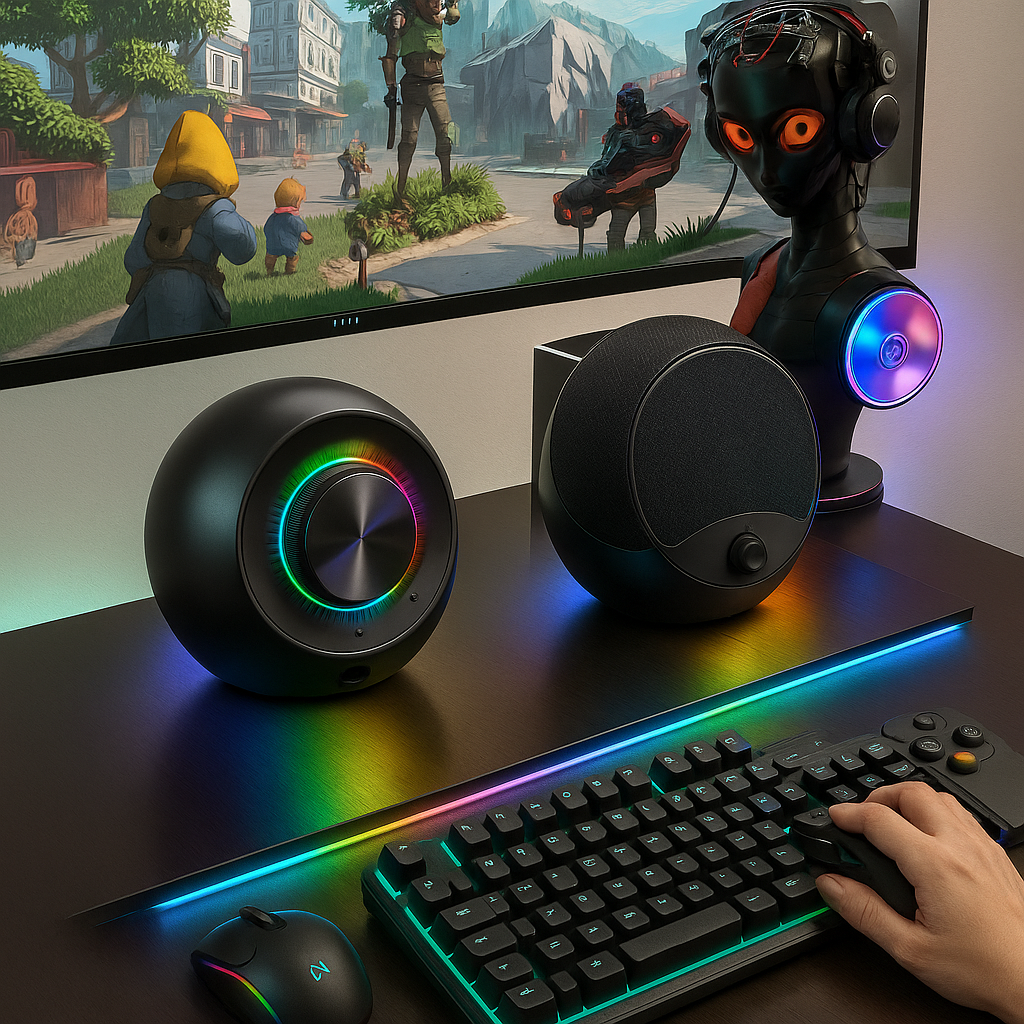
RGB Off Mode
RGB off mode is valuable because it expands the product beyond gaming.
The same speaker can then be used for:
Work
Study
Meetings
Nighttime listening
This can increase the addressable customer base without requiring a second hardware platform.
Step 13: Customize the Industrial Design
Brands may customize:
Cabinet shape
Grille
Housing texture
Logo position
RGB zones
Controls
A gaming speaker should visually fit the desktop environment.
Designers need to consider:
Monitor height
Speaker footprint
Desk depth
Cable direction
Step 14: Grille Design
The speaker grille affects both:
Appearance
Acoustic transmission
Possible grille materials include:
Metal
Fabric
Molded plastic
Custom metal grille patterns can create strong visual differentiation.
However, sufficient open area should remain for sound transmission.
Step 15: Customize the Housing Color
Color is one of the simplest ways to create product differentiation.
Possible directions include:
Black
White
Brand-specific accent colors
Color development may affect:
Material preparation
MOQ
Production planning
Brands should therefore confirm color requirements early.
Step 16: Volume Control Design
A physical volume knob can significantly improve user experience.
Possible customization includes:
Knob size
Surface texture
Lighting
Push function
For gaming products, a large control knob can become both:
Functional
Visually distinctive
Step 17: Button Layout
Buttons may control:
Power
Input source
Bluetooth
RGB
The goal should be simple operation.
A product with fewer intuitive controls can provide a better experience than one with many confusing buttons.
Step 18: Inter-Speaker Cable
The cable connecting the left and right speakers should be considered during product development.
Important decisions include:
Length
Thickness
Exit direction
Connector
The cable should allow sufficient speaker separation without creating unnecessary clutter.
Step 19: Branding
Private-label branding may include:
Printed logo
Laser marking
Molded logo
Illuminated branding
The correct solution depends on:
Product material
Design
Budget
Volume
Branding should feel integrated into the product rather than added as an afterthought.
Step 20: Packaging
Packaging is particularly important for private-label products.
Brands can customize:
Retail box
Product images
Features
Specifications
Brand story
Manual
The package should communicate the product's main benefits quickly.
E-Commerce Packaging
For online sellers, packaging also needs to protect both speakers during parcel transportation.
Important areas include:
Cabinet protection
Grille protection
Accessory organization
Separation between left and right speakers
The two cabinets should not rub against each other during shipping.
Retail Packaging
For physical retail, packaging should clearly communicate:
Product type
Connectivity
RGB
Main benefits
Strong shelf presentation can improve product understanding.
Step 21: Create Product Samples
Before mass production, evaluate the product sample carefully.
Check:
Audio
Left/right balance
Bass
Clarity
High-volume behavior
USB
Recognition
Playback
Reconnection
Bluetooth
Pairing
Stability
RGB
Synchronization
Brightness
Effects
Mechanical Quality
Grille
Housing
Knob
Buttons
Cables
Step 22: Test Real Desktop Usage
Place the sample on a real computer desk.
Use:
Monitor
Keyboard
PC
Laptop
Check:
Speaker footprint
Cable length
Control accessibility
RGB visibility
Stereo placement
The real environment may reveal issues that are not obvious during factory testing.
Step 23: Quality Control
2.0 speaker quality control should treat both cabinets as one complete system.
Important inspections include:
Driver consistency
Channel balance
PCB function
Bluetooth
USB audio
RGB synchronization
Controls
Inter-speaker cable
Appearance
Step 24: Aging Testing
Depending on project requirements, aging testing can help identify early failures related to:
Audio
Electronics
RGB
This is useful before products are packed and shipped.
Step 25: Packaging Inspection
Before shipment, packaging checks should verify:
Correct speaker pair
Accessories
Cables
User manual
Product labels
Carton markings
A missing inter-speaker cable can make the complete system unusable even if both speakers work perfectly.
MOQ Considerations
There is no universal MOQ for custom 2.0 speakers.
MOQ may depend on:
Existing vs custom platform
Housing color
RGB
Packaging
PCB
Tooling
An existing ODM platform generally provides greater flexibility than a completely new OEM product.
Cost Considerations
Factory pricing can be influenced by:
Drivers
Amplifier
USB audio
Bluetooth
RGB
Cabinet materials
Grille
Controls
Packaging
Order quantity
Buyers should compare products based on equivalent specifications rather than appearance alone.
Lead Time
ODM projects can usually move faster because the product platform already exists.
Full OEM projects may require:
Industrial design
Engineering
Prototype
Tooling
Testing
Pilot production
The deeper the customization, the more development work is required.
When Private Label Is Enough
A private-label solution may be appropriate when:
Market demand is not yet validated
Fast launch is important
Budget is limited
Existing products already meet most requirements
Customization can focus on:
Logo
Packaging
Color
When Semi-Custom Development Makes Sense
Semi-custom is useful when the brand wants stronger differentiation without rebuilding the whole product.
For example:
Keep:
Proven PCB
Drivers
Acoustic system
Customize:
Housing
RGB
Controls
Packaging
This can provide a strong balance between:
Cost
Speed
Differentiation
When Full OEM Makes Sense
Full OEM development is more appropriate when:
Sales volume is established
Existing products do not meet requirements
Exclusive design is important
Custom electronics are required
A long-term product platform is being created
The development investment should support a clear commercial advantage.
Building a Desktop Audio Product Family
Brands do not need to treat 2.0 speakers as an isolated product.
A desktop audio line could include:
2.0 RGB Speaker
For users who want:
Wider stereo placement
Traditional gaming layout
Gaming Soundbar
For users who want:
Compact monitor placement
Cleaner desk
Portable Bluetooth Speaker
For users who want:
Wireless mobility
Outdoor use
Travel
This creates a broader audio ecosystem across different scenarios.
Common OEM Mistake 1: Too Many Features
Adding every possible feature can increase:
Cost
PCB complexity
Firmware
Testing
Focus on what the target customer actually needs.
Common OEM Mistake 2: Confusing USB Power With USB Audio
These are different functions and should be clearly defined.
Common OEM Mistake 3: Ignoring Stereo Balance
The left and right speaker should perform as one coordinated system.
Common OEM Mistake 4: Ignoring Cable Length
Insufficient inter-speaker cable length can damage the actual desktop experience.
Common OEM Mistake 5: RGB Without Off Mode
For products targeting broader users, the ability to disable lighting can significantly increase versatility.
Common OEM Mistake 6: Comparing Factory Quotations Without Matching Specifications
A cheaper quotation may use different:
Drivers
PCB
Bluetooth
USB functionality
RGB
Packaging
Always compare equivalent configurations.
🏭 Real Factory Insight
One of the best ways to optimize a 2.0 computer speaker is to avoid designing it as a list of functions.
Instead, begin with the user's desk.
For example:
A mainstream user may need:
USB digital audio for PC
Bluetooth for smartphone music
RGB for gaming
RGB off mode for work
One large volume knob
That is already a clear product concept.
Adding five more buttons and several rarely used interfaces may increase cost without improving the user experience.
Good OEM development is not about customizing everything.
It is about customizing the parts that make the product more useful, recognizable, and competitive.
Buyer OEM Checklist
Before requesting a quotation, define:
Target user
Target market
Target retail price
Sales channel
USB power or USB audio
One-cable requirement
Bluetooth
AUX
Driver size
Target sound
RGB
RGB off mode
Housing design
Housing color
Grille
Controls
Inter-speaker cable length
Logo
Packaging
First-order quantity
Expected annual volume
Target launch date
This allows manufacturers to recommend a much more accurate OEM or ODM solution.
Why Choose Shinedee
Shenzhen Shinedee Electronics develops gaming and desktop audio products for global brands, importers, distributors, retailers, and online sellers.
Our capabilities include:
2.0 computer speaker OEM and ODM
RGB gaming speaker development
USB digital audio integration
Bluetooth integration
Acoustic tuning
Driver selection
PCB development
Industrial design support
RGB customization
Branding
Packaging customization
Product testing
Quality control
Mass production
Our core product categories include:
2.0 Computer Speakers
RGB Gaming Speakers
Gaming Soundbars
Portable Bluetooth Speakers
Outdoor Waterproof Speakers
Founded in 2010, Shinedee supports customers from product selection and private-label customization through engineering, sample validation, packaging, and stable mass production.
Frequently Asked Questions
Can 2.0 computer speakers be customized with my brand?
Yes. Depending on the OEM or ODM platform, customization can include logo, packaging, housing color, RGB, controls, connectivity, and selected acoustic features.
Can USB audio and Bluetooth be included in the same 2.0 speaker?
Yes. This combination is particularly useful because USB can serve PC users while Bluetooth provides wireless playback from other compatible devices.
Can I customize RGB lighting?
Yes. Depending on the product platform, brands can customize colors, effects, brightness, on/off behavior, and potentially lighting structure.
Can I customize the sound?
Yes. Depending on the development scope, manufacturers may adjust drivers, cabinet design, DSP, and overall sound tuning.
What is the difference between private label and full OEM?
Private label generally uses an existing product with branding customization. Full OEM may involve new industrial design, tooling, electronics, and acoustic development.
Is semi-custom development a good option?
Yes. It can provide stronger differentiation while reusing proven electronics and acoustic architecture, reducing development cost and risk.
What should I test before mass production?
Evaluate sound, stereo balance, USB audio, Bluetooth, RGB synchronization, controls, cables, mechanical quality, packaging, and real desktop use.
What determines the MOQ?
MOQ depends on the product platform, customization, housing color, packaging, electronics, tooling, and production requirements.
How can I get a more accurate OEM quotation?
Provide the manufacturer with your target market, retail price, quantity, connectivity requirements, RGB, product design, packaging, and expected launch date.
Conclusion
OEM and ODM manufacturing allow brands to develop 2.0 computer speakers for different market segments without building their own production facilities.
Customization can include:
USB digital audio
Bluetooth
RGB lighting
Acoustic tuning
Industrial design
Controls
Branding
Packaging
However, the most successful projects do not necessarily customize every component. They focus on the features that create clear customer value. For new brands, private label or ODM can provide a faster and lower-risk route to market.
For growing brands, semi-custom development can strengthen differentiation. For established brands, full OEM development can support exclusive product designs and longer-term product platforms.
Shinedee supports global customers with private-label, ODM, semi-custom, and OEM 2.0 computer speaker development—from product selection and engineering through quality control, packaging, and mass production.
🔎Read more: Gaming Speakers Manufacturer for OEM, ODM and Private Label Brands