How to Choose 2.0 Computer Speakers for Gaming, Work and Entertainment
How to Choose 2.0 Computer Speakers for Gaming, Work and Entertainment
Introduction
2.0 computer speakers are one of the most flexible desktop audio solutions.
They can be used for:
PC gaming
Home offices
Online learning
Music
Movies
Video calls
Everyday entertainment
However, the best 2.0 speaker for one user may not be the best choice for another.
A gamer may care about:
RGB lighting
Stereo separation
USB audio
A home-office user may prioritize:
Clear voices
Simple controls
Compact size
A general entertainment user may want:
Bluetooth
Better bass
Easy switching between devices
For brands, retailers, Amazon sellers, and importers, understanding these different usage scenarios is important when selecting or developing 2.0 desktop speakers.
This guide explains how to choose the right 2.0 computer speaker system for different users and applications.
What Is a 2.0 Computer Speaker System?
A 2.0 speaker system contains:
One left speaker
One right speaker
There is no separate subwoofer.The two-speaker structure provides physical stereo separation while keeping the system more compact than many 2.1 configurations.
Modern 2.0 computer speakers may support:
USB power
USB digital audio
Bluetooth
AUX input
RGB lighting
Volume controls
This makes the category suitable for a wide range of desktop users.
Why Usage Scenario Matters
A common mistake is selecting speakers only by specifications. For example, buyers may focus on:
Wattage
Bluetooth version
Driver size
These specifications are useful, but they do not tell the complete story.
The better question is:
How will the speaker actually be used?
The answer affects which features provide the most value.
1. 2.0 Computer Speakers for Gaming
Gaming users typically need a combination of:
Stereo sound
Convenient connectivity
Gaming aesthetics
Easy controls
A 2.0 system can be attractive because the left and right speakers can be placed on both sides of the monitor.
This provides flexible physical stereo separation.
Important Gaming Features:
USB Audio: USB digital audio can provide a convenient wired PC connection. For desktop gaming, this can simplify setup.
RGB Lighting
RGB helps the speakers integrate with:
Gaming keyboards
Mice
PC cases
Desk lighting
Physical Volume Control: A volume knob allows fast adjustment during gaming.
Bluetooth: Useful when users want to switch from PC gaming to smartphone music.
What Gamers Should Look For
Prioritize:
Good left/right balance
Appropriate stereo separation
Clear game effects
Convenient volume control
Stable PC connection
Do not choose only by maximum advertised wattage.
Actual performance depends on the complete acoustic system.
2. 2.0 Speakers for Home Offices
Home-office users often have different priorities.
They may use speakers for:
Video meetings
Online training
Background music
Business calls
General computer audio
Important features include:
Clear speech
Easy setup
Compact size
Simple volume control
RGB may be less important. If RGB is included, an off mode can make the product suitable for both gaming and office use.
USB Audio for Work: A one-cable USB audio speaker can be especially convenient on work desks.
Benefits may include:
Simple computer connection
Less cable clutter
Easy daily use
This can be useful for employees who frequently switch between:
Meetings
Training videos
Music
General computer audio
3. 2.0 Speakers for Students
Students may use one speaker system for many activities.
Examples include:
Online classes
Music
Movies
Gaming
Social media
For this audience, important factors may include:
Affordable price
Compact size
Bluetooth
Simple controls
Attractive design
A multifunctional 2.0 speaker can provide more value than a highly specialized product.
4. 2.0 Speakers for Music
Music users should pay more attention to acoustic performance.
Important factors include:
Driver quality
Cabinet design
Left/right balance
Bass response
Midrange clarity
Distortion
Stereo placement can significantly affect the listening experience. Users should place the two speakers with enough separation to create a clear stereo image.
5. 2.0 Speakers for Movies and Streaming
For movies and online video, users may prioritize:
Dialogue clarity
Balanced sound
Sufficient volume
Convenient connectivity
Bluetooth can be useful for tablets and laptops. USB audio can be useful for PCs. The best solution depends on the main playback device.
6. 2.0 Speakers for General Entertainment
Many consumers do not want a separate speaker for every activity.
They want one system for:
Music
Gaming
Movies
Calls
For these users, versatility may be more important than specialization.
A practical configuration might include:
USB audio
Bluetooth
RGB with off mode
Physical volume control
This provides flexibility across multiple scenarios.
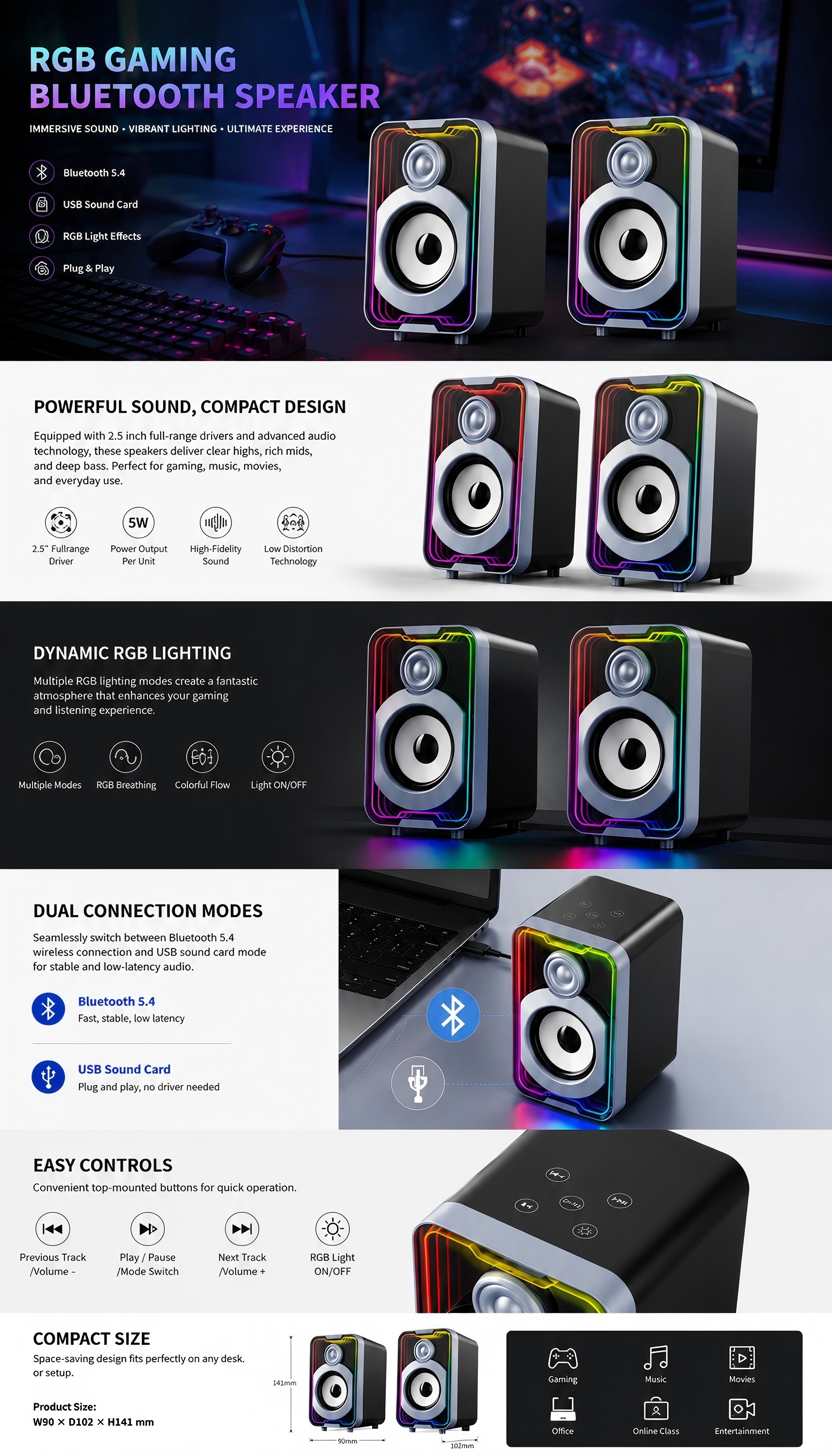
Gaming vs Work: What Changes?
| Feature | Gaming | Work |
|---|---|---|
| RGB | Important for many users | Optional |
| USB Audio | Very useful | Very useful |
| Stereo Separation | Important | Moderate |
| Voice Clarity | Important | Very important |
| Bluetooth | Useful | Useful |
| Compact Size | Important | Important |
| Control Access | Very important | Very important |
Brands developing multi-purpose products should look for features that work across both environments.
USB Audio vs AUX
USB Audio
Good for:
Modern PC setups
Gaming
Work
One-cable products
AUX
Good for:
Simple compatibility
Cost-focused products
Devices with analog audio outputs
AUX remains useful, but modern desktop products increasingly benefit from digital USB audio.
Bluetooth vs Wired Audio
Bluetooth
Advantages:
Wireless convenience
Smartphone compatibility
Flexible placement
Wired Audio
Advantages:
Stable connection
Simple PC integration
No pairing required
Many users benefit from having both.
Important things for 2.0 Speaker
Bluetooth
Bluetooth is especially valuable when the speaker is used for more than one device.
A user may:
Game on a desktop PC
Play music from a smartphone
Watch video from a laptop
Bluetooth makes switching scenarios easier. For a PC-only office speaker, it may be less essential.
RGB
RGB matters most when the product is positioned as a gaming accessory.
It can create:
Gaming atmosphere
Stronger visual identity
Better integration with other peripherals
However, lighting should not replace:
Sound quality
Stable connectivity
Good controls
For multifunctional products, RGB off mode improves versatility.
Speaker Size
Speaker dimensions affect:
Desk space
Driver size
Acoustic volume
Portability
Compact speakers are easier to place. Larger cabinets may provide greater acoustic flexibility. Brands should consider the typical desk environment of the target customer.
Desk Space
A user with a small desk may prefer:
Narrow cabinets
Compact footprints
Simple cables
A user with a larger gaming desk may have more freedom to separate the speakers and create a wider stereo image. Desktop ergonomics should be considered alongside sound.
Speaker Placement
For better stereo performance, the left and right speakers should be positioned appropriately around the user.
Placement can influence:
Stereo image
Vocal position
Bass perception
Poor placement can reduce the advantages of a 2.0 system.
Driver Size
Larger drivers are often associated with stronger sound, but driver size alone does not determine performance.
Sound also depends on:
Cabinet
Amplifier
DSP
Driver quality
Tuning
Users should evaluate the complete speaker rather than focusing only on driver diameter.
Wattage
Wattage can indicate part of the product's power capability, but it should not be treated as a direct sound-quality score.
Two products with similar wattage may sound very different because of:
Driver efficiency
Distortion
Cabinet design
DSP tuning
Brands should avoid developing products purely around a large number on the specification sheet.
Bass Performance
2.0 speakers do not have a separate subwoofer, but they can still provide satisfying bass.
Manufacturers may use:
Larger cabinets
Passive radiators
Bass ports
DSP
The correct approach depends on:
Product size
Target cost
Target sound
Controls
Good controls improve daily use.
Useful options include:
Volume knob
Power button
Input switch
Bluetooth pairing
RGB control
The controls should be easy to access without moving the speakers.
Inter-Speaker Cable Length
This is easy to overlook.
The cable connecting the left and right speakers affects how widely they can be positioned.
For:
Large monitors
Dual-monitor setups
Wide gaming desks
a longer cable may provide more flexibility.
However, excessively long cables can create clutter.
Choosing by User Type, Desk size & channel of sales
Choosing by User Type
Competitive Gamer
Prioritize:
USB audio
Stable wired connection
Stereo separation
Accessible volume control
Casual Gamer
Prioritize:
RGB
Bluetooth
Easy setup
Balanced sound
Home-Office User
Prioritize:
Voice clarity
Compact design
USB audio
Simple controls
Student
Prioritize:
Value
Bluetooth
Compact size
Multifunctionality
Music Listener
Prioritize:
Acoustic quality
Stereo balance
Cabinet design
Driver performance
Choosing by Desk Size
Small Desk
Look for:
Compact cabinets
Simple cable layout
Small footprint
Medium Desk
Provides more flexibility for:
Stereo separation
Larger cabinets
Large Gaming Desk
Can support:
Wider speaker placement
Strong RGB presentation
Larger desktop audio products
Choosing by Sales Channel
For brands and buyers, sales channel also matters.
Amazon
Products should offer easily communicated benefits such as:
USB audio
RGB
Bluetooth
Large volume knob
Compact footprint
Retail Stores
Packaging and clear feature communication become especially important.
Distribution
Buyers may prioritize:
Stable pricing
Broad user appeal
Reliable supply
Gaming Brands
Stronger visual identity and product ecosystem integration may matter more.
What B2B Buyers Should Test on Samples
When evaluating 2.0 computer speaker samples, check:
Sound
Left/right balance
Bass
Vocal clarity
Maximum volume
Connectivity
USB audio
Bluetooth
AUX
Controls
Volume
Input switching
RGB
Mechanical Quality
Housing
Grille
Buttons
Cables
Real Usage
Test with:
Gaming
Music
Calls
Video
A speaker may perform differently depending on content and environment.
Common Buying Mistake:
Common Buying Mistake 1: Choosing Only by Wattage. Higher wattage does not automatically mean better sound.
Common Buying Mistake 2: Ignoring USB Function
Confirm whether USB means:
Power only
Digital audio
Both
Common Buying Mistake 3: Ignoring Cable Length. The inter-speaker cable can limit real desktop placement.
Common Buying Mistake 4: Too Much RGB. RGB should enhance the product rather than create an uncomfortable user experience.
Common Buying Mistake 5: Ignoring Work Scenarios. A gaming-looking product can reach a wider market if:
RGB can be turned off
Controls are simple
Voice clarity is good
This can increase product versatility.
🏭 Real Factory Insight
One of the most useful questions during product selection is not:
Which speaker has the most functions?
It is:
Which functions will this customer actually use every day?
For example, consider two products.
Product A has:
Many lighting modes
Multiple buttons
More complicated controls
Product B has:
USB audio
Bluetooth
One volume knob
RGB on/off
For a mainstream user, Product B may provide a better experience even though the specification list is shorter.
Good product development is not about maximizing features. It is about matching features to real usage scenarios.
Buyer Decision Checklist
Before choosing or developing a 2.0 computer speaker, confirm:
Main usage scenario
Gaming, work, or multi-purpose
Target customer
Target retail price
Desk size
USB power or USB audio
Bluetooth requirement
AUX requirement
RGB requirement
RGB off mode
Sound profile
Speaker dimensions
Inter-speaker cable length
Control design
Packaging
Target market
Expected order quantity
This helps the manufacturer recommend a more suitable product rather than simply offering the model with the longest specification list.
Why Choose Shinedee
Shenzhen Shinedee Electronics develops gaming and desktop audio products for global brands, importers, retailers, distributors, and online sellers.
Our capabilities include:
2.0 computer speaker manufacturing
RGB gaming speaker development
USB digital audio integration
Bluetooth integration
Acoustic tuning
Driver selection
Industrial design support
RGB customization
OEM and ODM manufacturing
Product testing
Quality control
Packaging customization
Mass production
Our product categories include:
2.0 Computer Speakers
RGB Gaming Speakers
Gaming Soundbars
Portable Bluetooth Speakers
Outdoor Waterproof Speakers
Founded in 2010, Shinedee supports customers from product selection and customization through engineering, testing, packaging, and stable production.
Frequently Asked Questions
Are 2.0 computer speakers good for gaming? Yes. Separate left and right speakers provide flexible stereo placement and can support gaming features such as USB audio, Bluetooth, and RGB lighting.
Are 2.0 speakers good for home-office use? Yes. Compact 2.0 speakers can provide clearer computer audio for meetings, training, music, and everyday use.
Is USB audio useful for computer speakers? Yes. USB digital audio can provide a convenient wired connection between the computer and speaker and may support one-cable operation depending on the product design.
Is Bluetooth necessary for desktop speakers? Not always, but it adds flexibility for smartphones, tablets, laptops, and other compatible devices.
Does higher wattage mean better computer speakers? Not necessarily. Sound quality also depends on drivers, cabinet design, amplifier matching, distortion, DSP, and acoustic tuning.
Are larger 2.0 speakers always better? No. Larger cabinets may provide acoustic advantages, but they require more desk space. The correct size depends on the target user.
Can one 2.0 speaker model target gaming and office users? Yes. Features such as USB audio, Bluetooth, balanced sound, accessible controls, and switchable RGB can make a product suitable for multiple scenarios.
Can 2.0 computer speakers be customized for private-label brands? Yes. OEM and ODM customization can include branding, packaging, colors, RGB, controls, connectivity, and selected acoustic adjustments depending on the platform.
Conclusion
There is no single best 2.0 computer speaker for every user.
The right product depends on how it will be used.
Gamers may prioritize:
Stereo separation
USB audio
RGB
Fast controls
Home-office users may prioritize:
Voice clarity
Compact size
Simple connection
Students and general entertainment users may prefer:
Bluetooth
Versatility
Balanced sound
Affordable pricing
For brands and B2B buyers, the strongest product strategy is therefore not to maximize the specification list.It is to identify the target customer and select features that solve real everyday needs.
Shinedee supports global customers with OEM and ODM 2.0 computer speaker solutions for gaming, work, study, and entertainment, including USB audio, Bluetooth, RGB customization, acoustic tuning, packaging, and mass production.
Contact us today to get the latest brochure!