USB-Powered 2.0 Computer Speakers: USB Audio vs USB Power Explained
USB-Powered 2.0 Computer Speakers: USB Audio vs USB Power Explained
Introduction
USB is one of the most common connections found on modern 2.0 computer speakers.
However, the term “USB speaker” can describe two very different products:
A speaker that uses USB only for electrical power
A speaker that receives digital audio through USB
These two designs may look similar, but their functions, electronics, cables, user experience, and manufacturing costs are different.
This distinction is especially important for:
Gaming accessory brands
Computer peripheral brands
Amazon sellers
Importers
Retailers
OEM and ODM buyers
If the product specification simply says “USB speaker” without explaining whether USB carries power, audio, or both, buyers and end users may misunderstand the product.
This guide explains the difference between USB audio and USB power in 2.0 computer speakers and helps brands select the right solution for gaming, work, and everyday desktop use.
What Is a 2.0 Computer Speaker?
A 2.0 computer speaker system contains two main audio channels:
Left speaker
Right speaker
Unlike a 2.1 speaker system, it does not include a separate subwoofer.
A typical 2.0 computer speaker system may include:
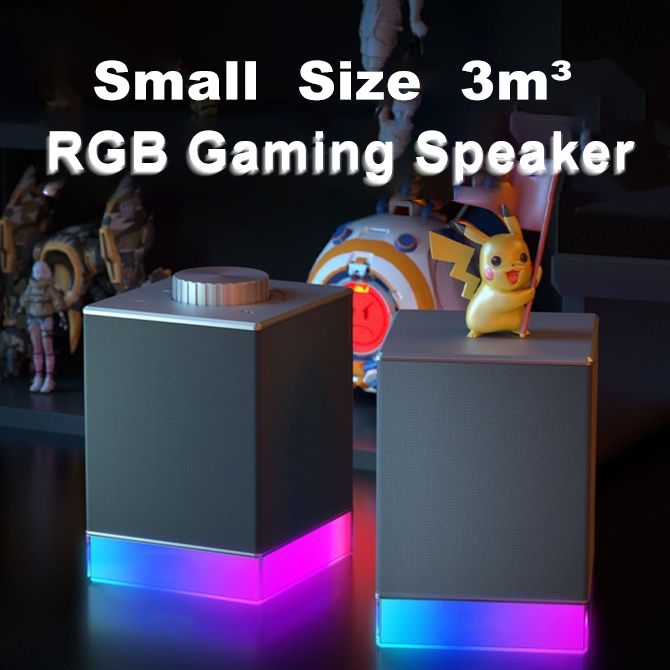
Two speaker cabinets
An inter-speaker cable
A USB power cable
AUX input
USB digital audio
Bluetooth
Volume controls
RGB lighting
The exact configuration depends on the target market and product positioning.
USB Power vs USB Audio: Quick Comparison
| Feature | USB Power Only | USB Digital Audio |
|---|---|---|
| USB supplies electricity | Yes | Often yes, depending on design |
| USB carries audio | No | Yes |
| Additional audio cable required | Usually AUX or Bluetooth | Not necessarily |
| Computer recognizes it as audio device | No | Yes |
| One-cable setup possible | No, unless audio is wireless | Yes, if power requirements allow |
| Electronics complexity | Lower | Higher |
| Best for | Cost-focused desktop speakers | PC gaming and modern desktop audio |
The most important difference is simple:
USB power provides electricity, while USB audio transmits digital sound.
What Is USB Power?
In a USB-powered speaker, the USB connection supplies electrical power to the speaker system.
The audio signal comes from another source.
Common audio inputs include:
3.5 mm AUX
Bluetooth
A typical USB-powered AUX speaker therefore uses two connections:
USB cable for power
AUX cable for audio
This design is common in entry-level desktop and office speakers because it is relatively simple and cost-effective.
Advantages of USB Power-Only Speakers
Simple Product Architecture
The USB connection only needs to supply power.
This reduces electronics complexity compared with a digital USB audio system.
Cost Efficiency
A simpler PCB and firmware architecture may help brands control manufacturing cost.
Broad AUX Compatibility
If the source device has a compatible analog output, users can connect the speaker through a standard AUX cable.
Suitable for Entry-Level Products
USB power-only solutions are often appropriate for:
Basic office speakers
Student speakers
Entry-level desktop speakers
Promotional products
Limitations of USB Power-Only Speakers
The main limitation is that USB does not carry the audio signal.
Users may need:
One USB cable for power
One AUX cable for audio
This creates more cable clutter.
It can also create confusion if the packaging says “USB speaker” without clearly explaining that USB is used only for power.
Some modern laptops and devices may not include a traditional 3.5 mm audio output, which can reduce AUX convenience.
What Is USB Digital Audio?
USB digital audio allows a compatible computer to send audio data directly to the speaker through USB.
When connected, the operating system recognizes the speaker as an audio output device.
The audio signal is processed through the speaker's internal electronic system.
This may include:
USB audio controller
Digital-to-analog conversion
Amplifier
DSP
Volume control
Depending on the power architecture, one USB cable may carry both:
Digital audio
Electrical power
This is commonly described as a one-cable desktop speaker solution.
Advantages of USB Audio Speakers
Cleaner Desktop Setup
If one USB cable carries both power and sound, users do not need a separate AUX cable.
This creates:
Cleaner cable management
Faster installation
Better desktop appearance
Convenient PC Integration
The computer can recognize the speaker as an audio output device.
This is particularly useful for:
Gaming PCs
Laptops
Home offices
Online meetings
Desktop entertainment
Stable Wired Connection
USB provides a direct wired audio connection without Bluetooth pairing.
This can be attractive for users who want a stable desktop audio experience.
Suitable for Gaming Products
USB audio fits naturally into products designed for:
PC gaming
RGB desktop setups
Gaming laptops
Streaming environments
Does USB Audio Automatically Mean Better Sound?
No.
USB audio describes the way the audio signal enters the speaker.
Final sound quality still depends on:
Speaker drivers
Amplifier
Acoustic cabinet
DSP tuning
PCB design
Power supply
Manufacturing quality
A well-engineered AUX speaker may sound better than a poorly designed USB audio speaker.
Brands should evaluate the complete product rather than treating the connection method as the only quality indicator.
What Is a One-Cable USB Speaker?
A one-cable USB speaker uses one connection for both:
Power
Digital audio
This can provide a very convenient user experience.
The user connects the speaker to the computer, selects it as the audio output device, and begins playback.
However, one-cable design depends on the available power and product architecture.
A compact 2.0 speaker with moderate output requirements may be suitable for one-cable operation.
A higher-output speaker with strong RGB lighting may require a different power solution.
Power Budget for USB Speakers
The USB connection must provide enough power for the complete system.
The power system may need to support:
Left and right speaker drivers
Amplifier
USB audio controller
Bluetooth
RGB lighting
Buttons and indicators
Many compact desktop speakers use a standard low-voltage USB power architecture, but the exact available power depends on the host port, cable, and product design.
Engineers must balance:
Audio Output + RGB Brightness + Electronic Functions
If the power requirement is too high, the product may need:
A dedicated power input
A different USB power architecture
Reduced amplifier output
Optimized RGB brightness
USB-C Does Not Automatically Mean USB Audio
A USB-C connector only describes the physical interface.
It does not automatically guarantee:
Digital audio
Fast charging
High-power operation
Data transmission
A USB-C port may be used for:
Power only
Audio and data
Other product-specific functions
Brands should clearly specify what the USB-C connection actually supports.
Packaging should not imply that a Type-C connector automatically provides advanced functions.
Cable Quality Matters
A USB cable may support:
Power only
Power and data
A charging-only cable cannot transmit USB digital audio.
For one-cable USB audio speakers, the included cable should support the intended data and power functions.
Poor cable quality may cause:
Computer recognition problems
Intermittent audio
Connection instability
Insufficient power
The cable should therefore be treated as a functional component, not only an accessory.
USB Audio vs AUX
USB Audio
Advantages:
Digital audio connection
Computer recognition
One-cable potential
Modern PC-focused user experience
Considerations:
Requires compatible electronics and firmware
Compatibility testing is important
Cable must support data
AUX
Advantages:
Simple analog connection
Mature and familiar
Relatively low electronics complexity
Considerations:
May require an additional USB power cable
Depends on the source device having an analog audio output
Can create more cable clutter
For modern PC gaming products, USB audio often provides a stronger feature proposition.
For cost-focused desktop speakers, USB power plus AUX can still be practical.
USB Audio vs Bluetooth
USB Audio
Best for:
Stable wired desktop use
PC gaming
Plug-and-play computer audio
Users who do not want wireless pairing
Bluetooth
Best for:
Wireless music playback
Smartphones
Tablets
Flexible device use
Many successful 2.0 computer speakers support both:
USB audio for PC use
Bluetooth for wireless lifestyle use
This combination can increase product versatility.
USB Audio and Gaming Latency
For gaming, audio and video synchronization matter.
A properly implemented USB audio connection can provide stable wired performance with low-latency potential.
However, actual end-to-end latency depends on:
USB audio chipset
Firmware
Computer operating system
Audio processing
DSP
Brands should evaluate real product performance rather than making claims based only on the connection type.
Plug-and-Play Compatibility
Many USB audio products can use standard operating-system audio support without requiring users to install special software.
However, manufacturers should still test compatibility with target systems.
Recommended testing may include:
Windows desktop computers
Windows laptops
macOS devices where applicable
Different USB ports
USB hubs
Sleep and wake behavior
Restart and reconnection
Volume adjustment
Product manuals should clearly explain how users select the speaker as their audio output device.
Common USB Speaker Problems
Speaker Has Power but No Sound
Possible reasons include:
USB is used only for power
The product is in the wrong mode
The computer has not selected the speaker as audio output
The cable does not support data
Computer Does Not Recognize the Speaker
Possible causes include:
Charging-only cable
USB port problem
Firmware issue
PCB issue
Operating-system compatibility
Audio Disconnects
Possible causes include:
Unstable USB power
Poor cable
USB hub limitations
Firmware
Connector problems
RGB Works but Audio Does Not
This may happen when USB is supplying power but the audio source has not been connected correctly.
Clear instructions can prevent many customer-support issues.
PCB Requirements for USB Audio
USB digital audio requires an appropriate PCB architecture.
The electronics may include:
USB audio controller
Amplifier
Bluetooth chipset
DSP
RGB controller
Power management
Engineers should consider:
Signal integrity
Electrical noise
PCB space
Thermal performance
Firmware compatibility
Adding USB audio is therefore more than changing the connector.
Controlling Electrical Noise
Desktop speakers may experience unwanted noise caused by:
USB power
Grounding
PCB layout
Digital circuits
RGB electronics
Poor engineering can create:
Buzzing
Humming
Digital interference
Manufacturers should coordinate:
PCB layout
Grounding
Power filtering
Signal routing
This is especially important in compact RGB computer speakers containing multiple electronic systems.
Left and Right Speaker Design
A 2.0 system often uses one master speaker and one secondary speaker.
The master speaker may contain:
PCB
Amplifier
USB audio controller
Bluetooth
Controls
The secondary speaker may contain fewer components.
This can create differences in available internal acoustic space.
Engineers should ensure that both speakers still provide balanced left and right performance.
Inter-Speaker Cable
The left and right speaker cabinets need a reliable connection.
Important considerations include:
Cable length
Cable strength
Connector type
Signal stability
Exit direction
A cable that is too short limits placement.
A cable that is too long creates unnecessary desktop clutter.
Which USB Speaker Design Is Best for Gaming?
For a modern mainstream gaming speaker, a practical configuration may include:
USB digital audio
USB power where technically suitable
Bluetooth
RGB lighting
Physical volume control
This provides:
USB → PC gaming
Bluetooth → Wireless music playback
However, the final configuration should still match the target retail price and power requirements.
Which Design Is Best for Office Use?
Office and home-office users may prioritize:
Simple connection
Clear voice reproduction
Compact size
RGB off mode
Easy volume control
A one-cable USB audio design can be particularly convenient because it reduces desktop cable clutter.
Which Design Is Best for Entry-Level Products?
For highly cost-sensitive products, a simpler configuration may be appropriate:
USB power
AUX audio
Basic controls
This reduces electronics complexity while still providing a practical desktop audio solution.
OEM Customization Options
Brands can customize several parts of a USB 2.0 speaker system.
Connection Architecture
Choose between:
USB power only
USB digital audio
USB audio plus Bluetooth
USB power plus AUX and Bluetooth
Controls
Customize:
Volume knob
Buttons
Input switching
RGB control
Acoustic Performance
Customize:
Drivers
Cabinet structure
DSP
Sound profile
RGB Lighting
Customize:
Lighting location
Effects
Brightness
On/off behavior
Branding and Packaging
Customize:
Logo
Housing color
Retail box
User manual
Included cables
ODM vs OEM USB Speaker Development
ODM
Uses an existing product platform.
Suitable for:
Faster market entry
Lower initial development cost
Private-label brands
Customization may include:
Logo
Packaging
Housing color
Selected RGB behavior
OEM
Can include deeper development such as:
New industrial design
Custom USB audio architecture
Custom PCB
Acoustic tuning
Custom RGB
Tooling
The correct approach depends on the brand's volume, budget, and differentiation goals.
Quality Control for USB 2.0 Speakers
Manufacturers should test the complete system.
Important checks include:
USB Function
Computer recognition
Audio playback
Reconnection
Volume behavior
Bluetooth
Pairing
Stability
Reconnection
Audio
Left/right channels
Channel balance
Abnormal noise
High-volume performance
RGB
Lighting synchronization
Effects
Brightness
Controls
Cables
Data transmission
Power
Inter-speaker connection
Connector fit
🏭 Real Factory Insight
One of the most common customer complaints with USB computer speakers is not actually caused by sound quality.
It is caused by unclear product definition.
A buyer may believe:
USB means one cable carries power and sound.
But the actual product may use:
USB for power and AUX for sound.
Technically, both products may be described as USB-powered speakers.
But the user experience is completely different.
This is why manufacturers and brands should clearly define:
USB power only
USB digital audio
One-cable audio and power
Required data cable
Clear specifications reduce:
Customer confusion
Returns
Negative reviews
Support questions
Buyer Decision Checklist
Before requesting a quotation, confirm:
Is USB used for power only?
Is USB digital audio required?
Is one-cable operation required?
Is Bluetooth required?
Is AUX required?
Which operating systems must be supported?
What audio output is required?
Is RGB required?
Is RGB off mode required?
What type of USB connector is preferred?
Must the included cable support data?
What inter-speaker cable length is required?
What is the target retail price?
What is the expected order quantity?
Which markets will the product enter?
These answers help the manufacturer select the correct electronics and power architecture.
Why Choose Shinedee
Shenzhen Shinedee Electronics specializes in gaming and desktop audio development and manufacturing.
Our capabilities include:
2.0 computer speaker manufacturing
USB-powered speaker development
USB digital audio integration
Bluetooth integration
RGB gaming speaker development
PCB and electronics engineering
Acoustic tuning
Industrial design support
OEM and ODM customization
Product testing
Quality control
Mass production
Our product categories include:
2.0 Computer Speakers
RGB Gaming Speakers
Gaming Soundbars
Portable Bluetooth Speakers
Outdoor Waterproof Speakers
Founded in 2010, Shinedee supports global brands, importers, Amazon sellers, and retailers from product selection and customization through testing, packaging, and mass production.
Frequently Asked Questions
What is the difference between USB power and USB audio?
USB power supplies electricity to the speaker. USB audio transmits digital audio data from the computer to the speaker.
Can one USB cable provide both audio and power?
Yes, depending on the product's power requirements, PCB architecture, USB connection, and cable.
Does every USB-C speaker support USB audio?
No. USB-C describes the connector shape. The port may support power only or power and data, depending on the product design.
Why does a USB speaker have power but no sound?
The USB connection may be used only for power, the computer may not have selected the speaker as audio output, or the cable may not support data.
Is USB audio better than AUX?
USB audio provides a digital PC connection and can support a one-cable setup. AUX provides a simple analog connection. Final sound quality depends on the complete product design.
Is USB audio suitable for gaming?
Yes. A properly designed USB audio speaker can provide a stable wired connection suitable for PC gaming.
Does USB audio require special software?
Many products can use standard operating-system audio support, but manufacturers should test compatibility with target computers and operating systems.
Can USB audio and Bluetooth be included in the same speaker?
Yes. Many modern 2.0 computer speakers support USB audio for PC use and Bluetooth for wireless playback.
Can brands customize USB 2.0 speakers?
Yes. OEM and ODM customization can include USB architecture, Bluetooth, RGB, drivers, controls, housing, branding, cables, and packaging.
Conclusion
USB-powered 2.0 computer speakers can use very different connection architectures.
A USB connection may provide:
Power only
Digital audio only
Both power and digital audio
Brands should define this clearly before product development and communicate it accurately in specifications, packaging, and user manuals.
USB power plus AUX can provide a simple and cost-effective desktop speaker solution.
USB digital audio can provide a cleaner and more modern PC experience, especially when one cable supports both power and sound.
The best solution depends on:
Target user
Target price
Power requirements
Gaming functions
Connectivity
Product positioning
Shinedee supports global customers with OEM and ODM 2.0 computer speaker development, including USB power, USB digital audio, Bluetooth, RGB lighting, acoustic tuning, product testing, and mass production.